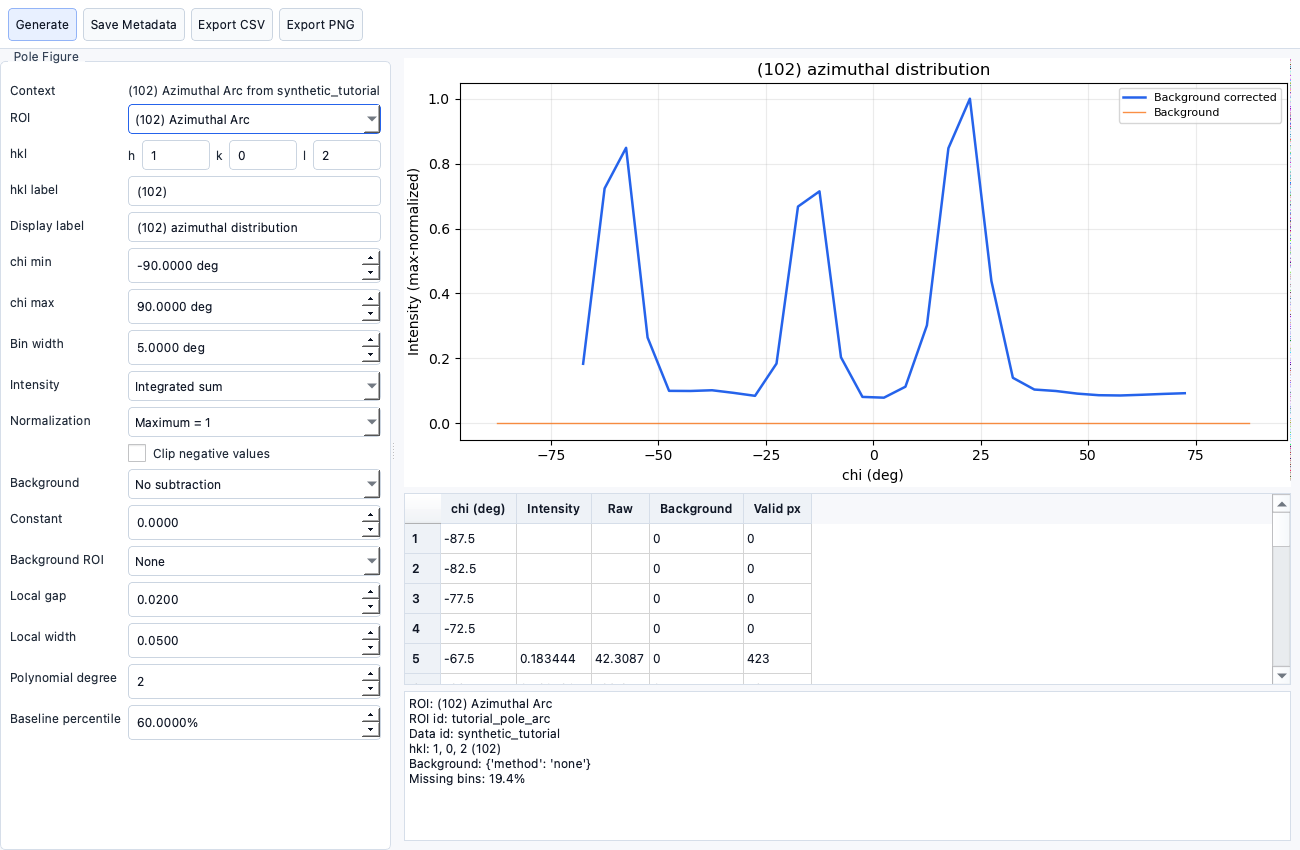
Pole Figure Generator
Documentation notice
This documentation was generated with help from a large language model and has not been fully vetted by the developer. Verify critical details against the source code and current application behavior.
The Pole Figure tool is launched from EWALD with selected data context.
Launching
- Open from main workflow action/button with an ROI selected.
- A separate window receives ROI,
q<sub>xy</sub>, andq<sub>z</sub>context.
hkl labels
- Enter
h,k,l, optional label text, and display name.
Background subtraction modes
- No subtraction
- Constant background
- Local annular/neighbor subtraction
- ROI-based background
- Polynomial baseline
Exporting pole figures
- Export CSV and PNG outputs from the generator window.
- Metadata can be saved with output and reloaded via project history where supported.
Linking to ROI metadata
- Generated output and status are stored in ROI-linked metadata.
- Stale detection marks outputs as outdated when ROI geometry changes.
Stale workflow state
- ROI edits can invalidate prior pole figures.
- Re-run to refresh stale status.